lcm lora sdxl
par latent-consistency
Open source · 17k downloads · 768 likes
3.6
(768 avis)ImageAPI & LocalÀ propos
Le modèle LCM LoRA SDXL est une adaptation optimisée du modèle Stable Diffusion XL, conçue pour générer des images de haute qualité en un nombre minimal d'étapes d'inférence, généralement entre 2 et 8. Il se distingue par sa capacité à accélérer considérablement le processus de création d'images tout en conservant une qualité visuelle comparable aux méthodes traditionnelles, qui nécessitent souvent 20 à 50 étapes. Ce modèle excelle dans des tâches variées comme la génération text-to-image, l'inpainting, ou encore l'intégration avec d'autres modules comme les LoRAs stylisés, les ControlNet ou les T2I Adapters, offrant ainsi une grande flexibilité d'utilisation. Son principal atout réside dans son efficacité, permettant des temps de génération réduits sans sacrifier la précision ou la créativité des résultats. Idéal pour les applications nécessitant rapidité et performance, il s'adapte aussi bien aux usages créatifs qu'aux besoins industriels où la vitesse est cruciale.
Documentation
Latent Consistency Model (LCM) LoRA: SDXL
Latent Consistency Model (LCM) LoRA was proposed in LCM-LoRA: A universal Stable-Diffusion Acceleration Module by Simian Luo, Yiqin Tan, Suraj Patil, Daniel Gu et al.
It is a distilled consistency adapter for stable-diffusion-xl-base-1.0 that allows
to reduce the number of inference steps to only between 2 - 8 steps.
| Model | Params / M |
|---|---|
| lcm-lora-sdv1-5 | 67.5 |
| lcm-lora-ssd-1b | 105 |
| lcm-lora-sdxl | 197M |
Usage
LCM-LoRA is supported in 🤗 Hugging Face Diffusers library from version v0.23.0 onwards. To run the model, first
install the latest version of the Diffusers library as well as peft, accelerate and transformers.
audio dataset from the Hugging Face Hub:
Bash
pip install --upgrade pip
pip install --upgrade diffusers transformers accelerate peft
Note: For detailed usage examples we recommend you to check out our official LCM-LoRA docs
Text-to-Image
The adapter can be loaded with it's base model stabilityai/stable-diffusion-xl-base-1.0. Next, the scheduler needs to be changed to LCMScheduler and we can reduce the number of inference steps to just 2 to 8 steps.
Please make sure to either disable guidance_scale or use values between 1.0 and 2.0.
Python
import torch
from diffusers import LCMScheduler, AutoPipelineForText2Image

model_id = "stabilityai/stable-diffusion-xl-base-1.0"
adapter_id = "latent-consistency/lcm-lora-sdxl"

pipe = AutoPipelineForText2Image.from_pretrained(model_id, torch_dtype=torch.float16, variant="fp16")
pipe.scheduler = LCMScheduler.from_config(pipe.scheduler.config)
pipe.to("cuda")

# load and fuse lcm lora
pipe.load_lora_weights(adapter_id)
pipe.fuse_lora()

prompt = "Self-portrait oil painting, a beautiful cyborg with golden hair, 8k"

# disable guidance_scale by passing 0
image = pipe(prompt=prompt, num_inference_steps=4, guidance_scale=0).images[0]

Inpainting
LCM-LoRA can be used for inpainting as well.
Python
import torch
from diffusers import AutoPipelineForInpainting, LCMScheduler
from diffusers.utils import load_image, make_image_grid

pipe = AutoPipelineForInpainting.from_pretrained(
    "diffusers/stable-diffusion-xl-1.0-inpainting-0.1",
    torch_dtype=torch.float16,
    variant="fp16",
).to("cuda")

# set scheduler
pipe.scheduler = LCMScheduler.from_config(pipe.scheduler.config)

# load LCM-LoRA
pipe.load_lora_weights("latent-consistency/lcm-lora-sdxl")
pipe.fuse_lora()

# load base and mask image
init_image = load_image("https://huggingface.co/datasets/huggingface/documentation-images/resolve/main/diffusers/inpaint.png").resize((1024, 1024))
mask_image = load_image("https://huggingface.co/datasets/huggingface/documentation-images/resolve/main/diffusers/inpaint_mask.png").resize((1024, 1024))

prompt = "a castle on top of a mountain, highly detailed, 8k"
generator = torch.manual_seed(42)
image = pipe(
    prompt=prompt,
    image=init_image,
    mask_image=mask_image,
    generator=generator,
    num_inference_steps=5,
    guidance_scale=4,
).images[0]
make_image_grid([init_image, mask_image, image], rows=1, cols=3)

Combine with styled LoRAs
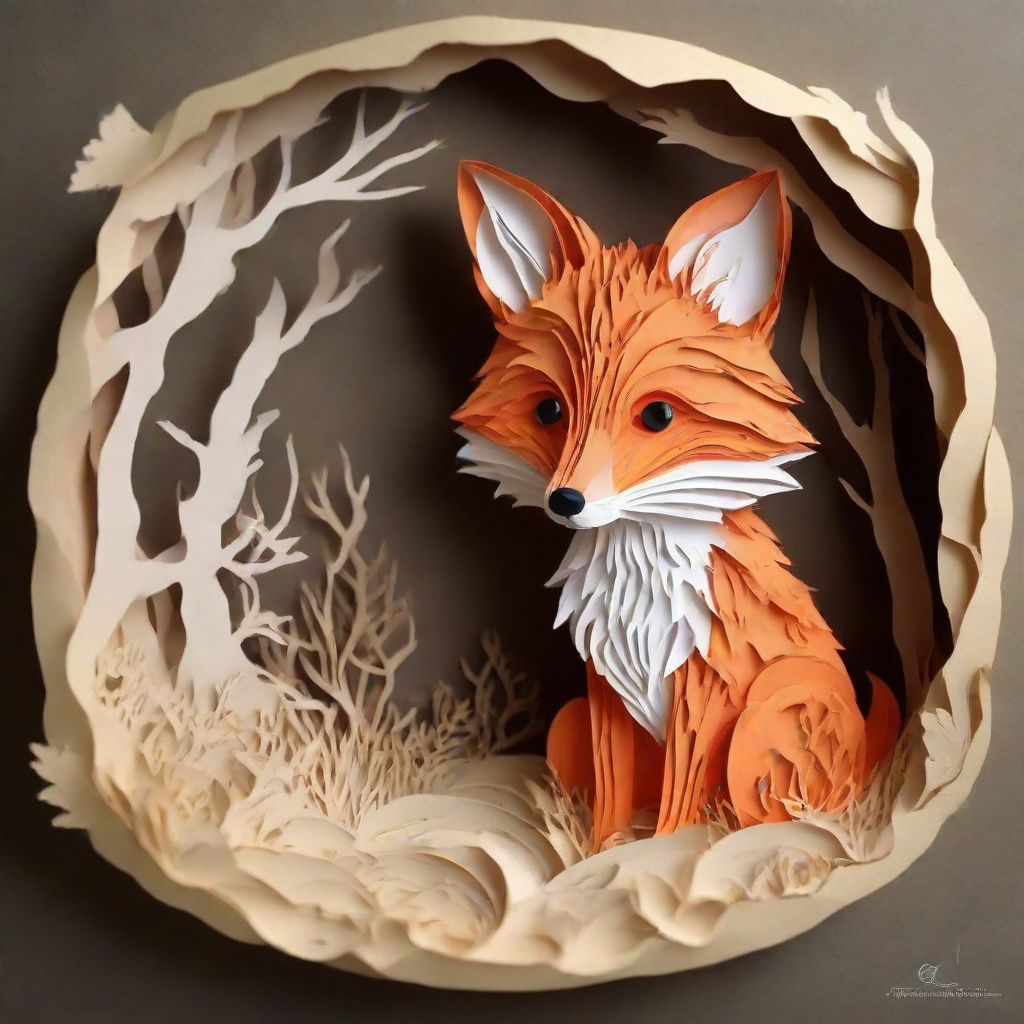
LCM-LoRA can be combined with other LoRAs to generate styled-images in very few steps (4-8). In the following example, we'll use the LCM-LoRA with the papercut LoRA. To learn more about how to combine LoRAs, refer to this guide.
Python
import torch
from diffusers import DiffusionPipeline, LCMScheduler

pipe = DiffusionPipeline.from_pretrained(
    "stabilityai/stable-diffusion-xl-base-1.0",
    variant="fp16",
    torch_dtype=torch.float16
).to("cuda")

# set scheduler
pipe.scheduler = LCMScheduler.from_config(pipe.scheduler.config)

# load LoRAs
pipe.load_lora_weights("latent-consistency/lcm-lora-sdxl", adapter_name="lcm")
pipe.load_lora_weights("TheLastBen/Papercut_SDXL", weight_name="papercut.safetensors", adapter_name="papercut")

# Combine LoRAs
pipe.set_adapters(["lcm", "papercut"], adapter_weights=[1.0, 0.8])

prompt = "papercut, a cute fox"
generator = torch.manual_seed(0)
image = pipe(prompt, num_inference_steps=4, guidance_scale=1, generator=generator).images[0]
image
ControlNet
Python
import torch
import cv2
import numpy as np
from PIL import Image

from diffusers import StableDiffusionXLControlNetPipeline, ControlNetModel, LCMScheduler
from diffusers.utils import load_image

image = load_image(
    "https://hf.co/datasets/huggingface/documentation-images/resolve/main/diffusers/input_image_vermeer.png"
).resize((1024, 1024))

image = np.array(image)

low_threshold = 100
high_threshold = 200

image = cv2.Canny(image, low_threshold, high_threshold)
image = image[:, :, None]
image = np.concatenate([image, image, image], axis=2)
canny_image = Image.fromarray(image)

controlnet = ControlNetModel.from_pretrained("diffusers/controlnet-canny-sdxl-1.0-small", torch_dtype=torch.float16, variant="fp16")
pipe = StableDiffusionXLControlNetPipeline.from_pretrained(
    "stabilityai/stable-diffusion-xl-base-1.0",
    controlnet=controlnet,
    torch_dtype=torch.float16,
    safety_checker=None,
    variant="fp16"
).to("cuda")

# set scheduler
pipe.scheduler = LCMScheduler.from_config(pipe.scheduler.config)

# load LCM-LoRA
pipe.load_lora_weights("latent-consistency/lcm-lora-sdxl")
pipe.fuse_lora()

generator = torch.manual_seed(0)
image = pipe(
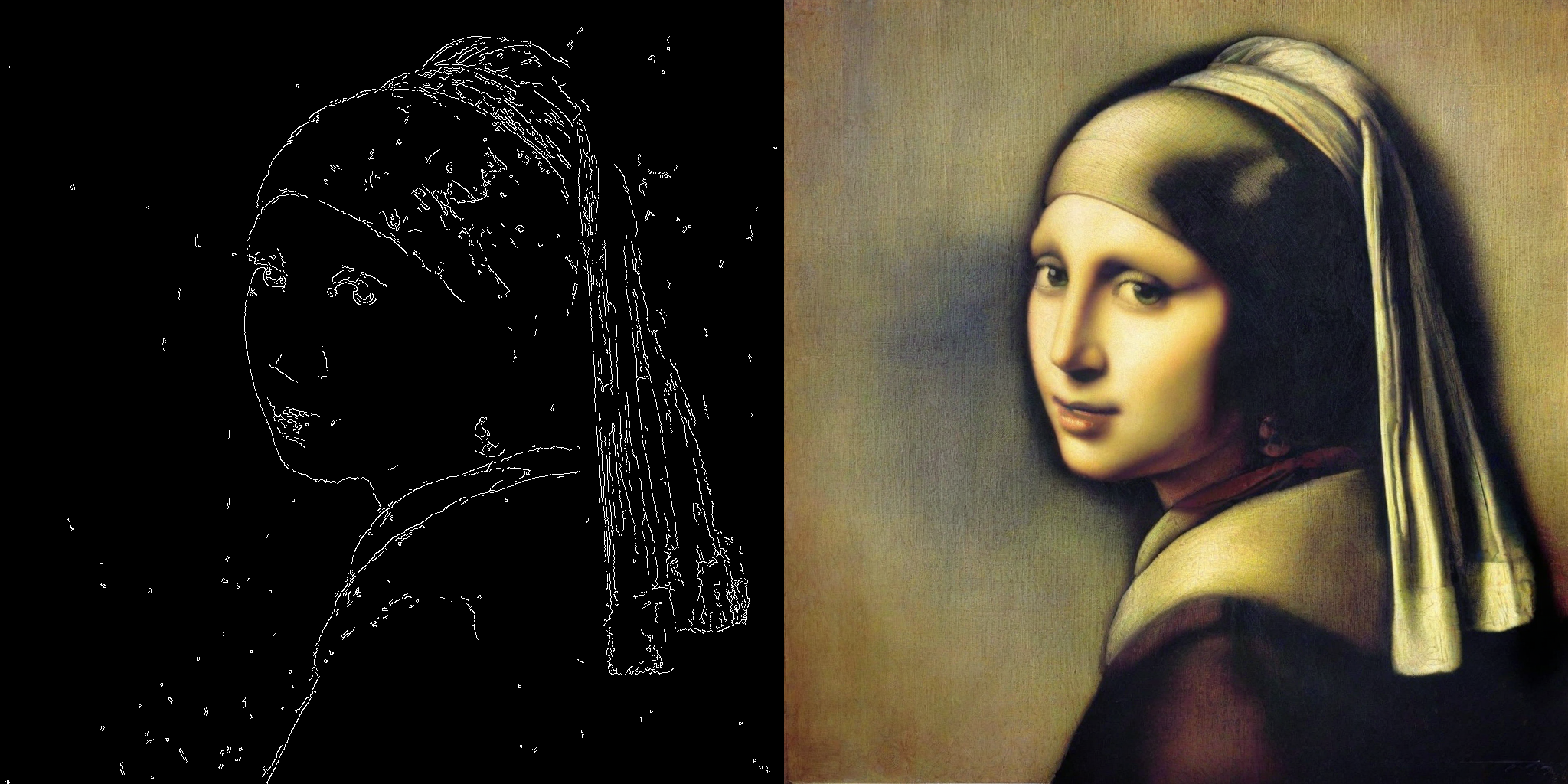
    "picture of the mona lisa",
    image=canny_image,
    num_inference_steps=5,
    guidance_scale=1.5,
    controlnet_conditioning_scale=0.5,
    cross_attention_kwargs={"scale": 1},
    generator=generator,
).images[0]
make_image_grid([canny_image, image], rows=1, cols=2)
T2I Adapter
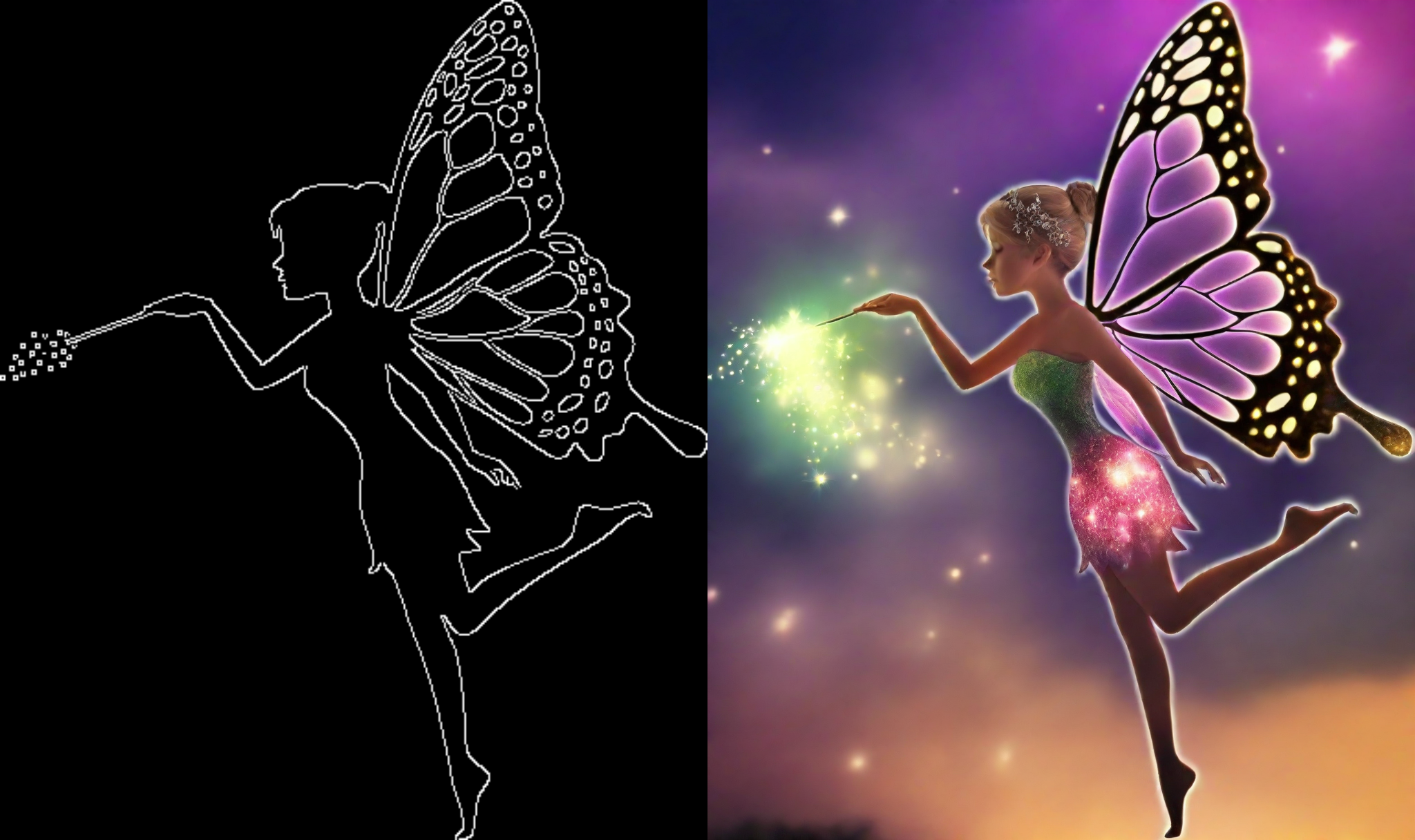
This example shows how to use the LCM-LoRA with the Canny T2I-Adapter and SDXL.
Python
import torch
import cv2
import numpy as np
from PIL import Image

from diffusers import StableDiffusionXLAdapterPipeline, T2IAdapter, LCMScheduler
from diffusers.utils import load_image, make_image_grid

# Prepare image
# Detect the canny map in low resolution to avoid high-frequency details
image = load_image(
    "https://huggingface.co/Adapter/t2iadapter/resolve/main/figs_SDXLV1.0/org_canny.jpg"
).resize((384, 384))

image = np.array(image)

low_threshold = 100
high_threshold = 200

image = cv2.Canny(image, low_threshold, high_threshold)
image = image[:, :, None]
image = np.concatenate([image, image, image], axis=2)
canny_image = Image.fromarray(image).resize((1024, 1024))

# load adapter
adapter = T2IAdapter.from_pretrained("TencentARC/t2i-adapter-canny-sdxl-1.0", torch_dtype=torch.float16, varient="fp16").to("cuda")

pipe = StableDiffusionXLAdapterPipeline.from_pretrained(
    "stabilityai/stable-diffusion-xl-base-1.0",
    adapter=adapter,
    torch_dtype=torch.float16,
    variant="fp16",
).to("cuda")

# set scheduler
pipe.scheduler = LCMScheduler.from_config(pipe.scheduler.config)

# load LCM-LoRA
pipe.load_lora_weights("latent-consistency/lcm-lora-sdxl")

prompt = "Mystical fairy in real, magic, 4k picture, high quality"
negative_prompt = "extra digit, fewer digits, cropped, worst quality, low quality, glitch, deformed, mutated, ugly, disfigured"

generator = torch.manual_seed(0)
image = pipe(
    prompt=prompt,
    negative_prompt=negative_prompt,
    image=canny_image,
    num_inference_steps=4,
    guidance_scale=1.5,
    adapter_conditioning_scale=0.8,
    adapter_conditioning_factor=1,
    generator=generator,
).images[0]
make_image_grid([canny_image, image], rows=1, cols=2)
Speed Benchmark
TODO
Training
TODO
Liens & Ressources