MOSS SoundEffect
par OpenMOSS-Team
Open source · 4k downloads · 48 likes
2.1
(48 avis)AudioAPI & LocalÀ propos
MOSS SoundEffect est un modèle de génération de sons et d'effets sonores à partir de texte, conçu pour produire des ambiances réalistes et des bruits variés avec une grande fidélité. Il couvre un large éventail de catégories, allant des environnements urbains aux sons naturels, en passant par les actions humaines et les créatures, tout en permettant un contrôle précis de la durée des effets générés. Idéal pour les productions audiovisuelles, les jeux vidéo ou les médias interactifs, il se distingue par sa stabilité et sa capacité à s'adapter à des scénarios complexes. Contrairement aux solutions génériques, il offre une qualité professionnelle adaptée aux besoins des créateurs de contenu et des développeurs.
Documentation
MOSS-TTS Family








Overview
MOSS‑TTS Family is an open‑source speech and sound generation model family from MOSI.AI and the OpenMOSS team. It is designed for high‑fidelity, high‑expressiveness, and complex real‑world scenarios, covering stable long‑form speech, multi‑speaker dialogue, voice/character design, environmental sound effects, and real‑time streaming TTS.
Introduction
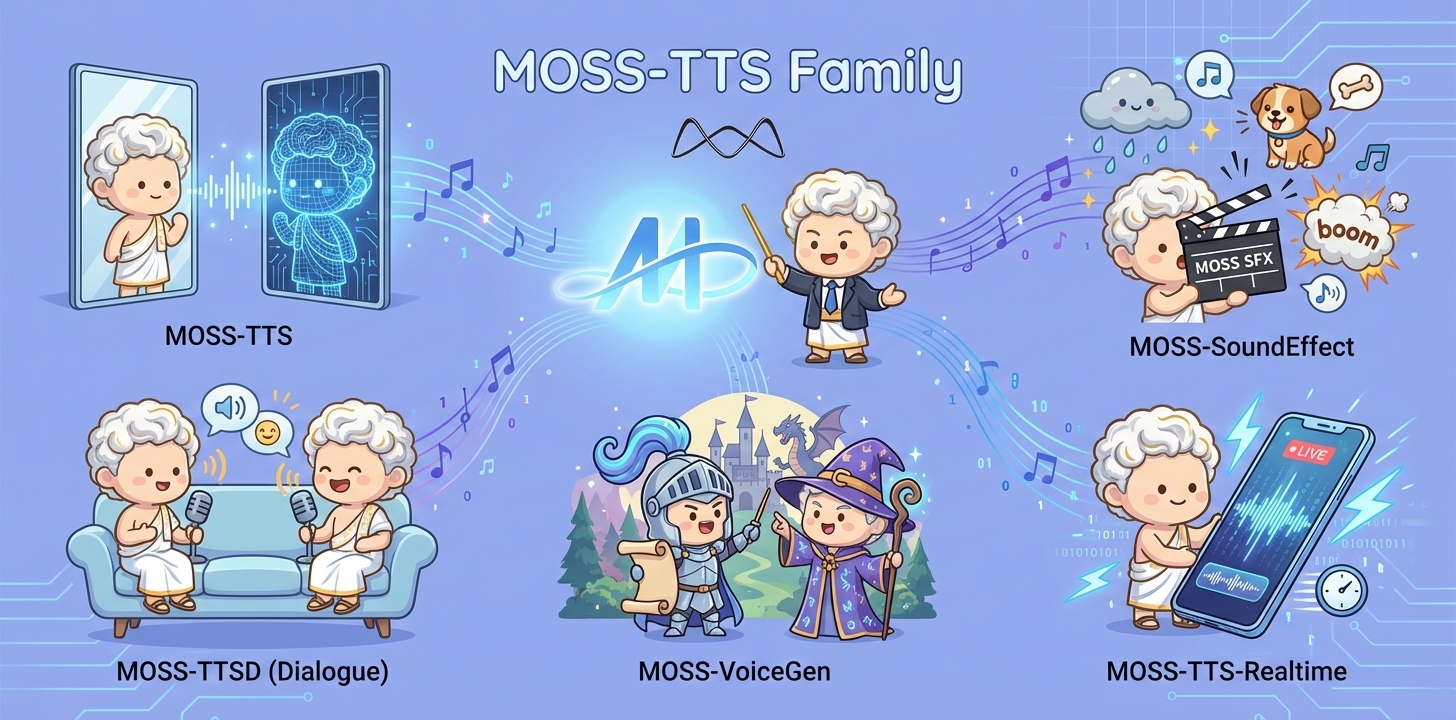
When a single piece of audio needs to sound like a real person, pronounce every word accurately, switch speaking styles across content, remain stable over tens of minutes, and support dialogue, role‑play, and real‑time interaction, a single TTS model is often not enough. The MOSS‑TTS Family breaks the workflow into five production‑ready models that can be used independently or composed into a complete pipeline.
- MOSS‑TTS: MOSS-TTS is the flagship production TTS foundation model, centered on high-fidelity zero-shot voice cloning with controllable long-form synthesis, pronunciation, and multilingual/code-switched speech. It serves as the core engine for scalable narration, dubbing, and voice-driven products.
- MOSS‑TTSD: MOSS-TTSD is a production long-form dialogue model for expressive multi-speaker conversational audio at scale. It supports long-duration continuity, turn-taking control, and zero-shot voice cloning from short references for podcasts, audiobooks, commentary, dubbing, and entertainment dialogue.
- MOSS‑VoiceGenerator: MOSS-VoiceGenerator is an open-source voice design model that creates speaker timbres directly from free-form text, without reference audio. It unifies timbre design, style control, and content synthesis, and can be used standalone or as a voice-design layer for downstream TTS.
- MOSS‑SoundEffect: MOSS-SoundEffect is a high-fidelity text-to-sound model with broad category coverage and controllable duration for real content production. It generates stable audio from prompts across ambience, urban scenes, creatures, human actions, and music-like clips for film, games, interactive media, and data synthesis.
- MOSS‑TTS‑Realtime: MOSS-TTS-Realtime is a context-aware, multi-turn streaming TTS model for real-time voice agents. By conditioning on dialogue history across both text and prior user acoustics, it delivers low-latency synthesis with coherent, consistent voice responses across turns.
Released Models
| Model | Architecture | Size | Model Card | Hugging Face |
|---|---|---|---|---|
| MOSS-TTS | MossTTSDelay | 8B | moss_tts_model_card.md | 🤗 Huggingface |
| MossTTSLocal | 1.7B | moss_tts_model_card.md | 🤗 Huggingface | |
| MOSS‑TTSD‑V1.0 | MossTTSDelay | 8B | moss_ttsd_model_card.md | 🤗 Huggingface |
| MOSS‑VoiceGenerator | MossTTSDelay | 1.7B | moss_voice_generator_model_card.md | 🤗 Huggingface |
| MOSS‑SoundEffect | MossTTSDelay | 8B | moss_sound_effect_model_card.md | 🤗 Huggingface |
| MOSS‑TTS‑Realtime | MossTTSRealtime | 1.7B | moss_tts_realtime_model_card.md | 🤗 Huggingface |
MOSS-SoundEffect
MOSS-SoundEffect is the environment sound & sound effect generation model in the MOSS‑TTS Family. It generates ambient soundscapes and concrete sound effects directly from text descriptions, and is designed to complement speech content with immersive context in production workflows.
1. Overview
1.1 TTS Family Positioning
MOSS-SoundEffect is designed as an audio generation backbone for creating high-fidelity environmental and action sounds from text, serving both scalable content pipelines and a strong research baseline for controllable audio generation.
Design goals
- Coverage & richness: broad sound taxonomy with layered ambience and realistic texture
- Composability: easy integration into creative pipelines (games/film/tools) and synthetic data generation setups
1.2 Key Capabilities
MOSS‑SoundEffect focuses on contextual audio completion beyond speech, enabling creators and systems to enrich scenes with believable acoustic environments and action‑level cues.
What it can generate
- Natural environments: e.g., “fresh snow crunching under footsteps.”
- Urban environments: e.g., “a sports car roaring past on the highway.”
- Animals & creatures: e.g., “early morning park with birds chirping in a quiet atmosphere.”
- Human actions: e.g., “clear footsteps echoing on concrete at a steady rhythm.”
Why it matters
- Completes scene immersion for narrative content, film/TV, documentaries, games, and podcasts.
- Supports voice agents and interactive systems that need ambient context, not just speech.
- Acts as the sound‑design layer of the MOSS‑TTS Family’s end‑to‑end workflow.
1.3 Model Architecture
MOSS-SoundEffect employs the MossTTSDelay architecture (see moss_tts_delay/README.md), reusing the same discrete token generation backbone for audio synthesis. A text prompt (optionally with simple control tags such as duration) is tokenized and fed into the Delay-pattern autoregressive model to predict RVQ audio tokens over time. The generated tokens are then decoded by the audio tokenizer/vocoder to produce high-fidelity sound effects, enabling consistent quality and controllable length across diverse SFX categories.
1.4 Released Models
Recommended decoding hyperparameters
| Model | audio_temperature | audio_top_p | audio_top_k | audio_repetition_penalty |
|---|---|---|---|---|
| MOSS-SoundEffect | 1.5 | 0.6 | 50 | 1.2 |
2. Quick Start
Environment Setup
We recommend a clean, isolated Python environment with Transformers 5.0.0 to avoid dependency conflicts.
Bash
conda create -n moss-tts python=3.12 -y
conda activate moss-tts
Install all required dependencies:
Bash
git clone https://github.com/OpenMOSS/MOSS-TTS.git
cd MOSS-TTS
pip install --extra-index-url https://download.pytorch.org/whl/cu128 -e .
(Optional) Install FlashAttention 2
For better speed and lower GPU memory usage, you can install FlashAttention 2 if your hardware supports it.
Bash
pip install --extra-index-url https://download.pytorch.org/whl/cu128 -e ".[flash-attn]"
If your machine has limited RAM and many CPU cores, you can cap build parallelism:
Bash
MAX_JOBS=4 pip install --extra-index-url https://download.pytorch.org/whl/cu128 -e ".[flash-attn]"
Notes:
- Dependencies are managed in
pyproject.toml, which currently pinstorch==2.9.1+cu128andtorchaudio==2.9.1+cu128. - If FlashAttention 2 fails to build on your machine, you can skip it and use the default attention backend.
- FlashAttention 2 is only available on supported GPUs and is typically used with
torch.float16ortorch.bfloat16.
Basic Usage
Python
from pathlib import Path
import importlib.util
import torch
import torchaudio
from transformers import AutoModel, AutoProcessor
# Disable the broken cuDNN SDPA backend
torch.backends.cuda.enable_cudnn_sdp(False)
# Keep these enabled as fallbacks
torch.backends.cuda.enable_flash_sdp(True)
torch.backends.cuda.enable_mem_efficient_sdp(True)
torch.backends.cuda.enable_math_sdp(True)


pretrained_model_name_or_path = "OpenMOSS-Team/MOSS-SoundEffect"
device = "cuda" if torch.cuda.is_available() else "cpu"
dtype = torch.bfloat16 if device == "cuda" else torch.float32

def resolve_attn_implementation() -> str:
    # Prefer FlashAttention 2 when package + device conditions are met.
    if (
        device == "cuda"
        and importlib.util.find_spec("flash_attn") is not None
        and dtype in {torch.float16, torch.bfloat16}
    ):
        major, _ = torch.cuda.get_device_capability()
        if major >= 8:
            return "flash_attention_2"

    # CUDA fallback: use PyTorch SDPA kernels.
    if device == "cuda":
        return "sdpa"

    # CPU fallback.
    return "eager"


attn_implementation = resolve_attn_implementation()
print(f"[INFO] Using attn_implementation={attn_implementation}")

processor = AutoProcessor.from_pretrained(
    pretrained_model_name_or_path,
    trust_remote_code=True,
)
processor.audio_tokenizer = processor.audio_tokenizer.to(device)

text_1 = "雷声隆隆,雨声淅沥。"
text_2 = "清晰脚步声在水泥地面回响,节奏稳定。"

conversations = [
    [processor.build_user_message(ambient_sound=text_1)],
    [processor.build_user_message(ambient_sound=text_2)]
]

model = AutoModel.from_pretrained(
    pretrained_model_name_or_path,
    trust_remote_code=True,
    # If FlashAttention 2 is installed, you can set attn_implementation="flash_attention_2"
    attn_implementation=attn_implementation,
    torch_dtype=dtype,
).to(device)
model.eval()

batch_size = 1

save_dir = Path("inference_root")
save_dir.mkdir(exist_ok=True, parents=True)
sample_idx = 0
with torch.no_grad():
    for start in range(0, len(conversations), batch_size):
        batch_conversations = conversations[start : start + batch_size]
        batch = processor(batch_conversations, mode="generation")
        input_ids = batch["input_ids"].to(device)
        attention_mask = batch["attention_mask"].to(device)

        outputs = model.generate(
            input_ids=input_ids,
            attention_mask=attention_mask,
            max_new_tokens=4096,
        )

        for message in processor.decode(outputs):
            audio = message.audio_codes_list[0]
            out_path = save_dir / f"sample{sample_idx}.wav"
            sample_idx += 1
            torchaudio.save(out_path, audio.unsqueeze(0), processor.model_config.sampling_rate)
Input Types
UserMessage
| Field | Type | Required | Description |
|---|---|---|---|
ambient_sound | str | Yes | Description of environment sound & sound effect |
tokens | int | No | Expected number of audio tokens. 1s ≈ 12.5 tokens. |
Liens & Ressources