Qwen3 Coder Next AWQ 4bit
by cyankiwi
Open source · 155k downloads · 24 likes
1.7
(24 reviews)CodeAPI & LocalAbout
Qwen3 Coder Next AWQ 4bit is a language model specialized in software development assistance and autonomous agents. Designed for extreme efficiency, it activates only 3 billion parameters out of a total of 80 billion while delivering performance comparable to much larger models, making it particularly cost-effective for local or production deployment. With its advanced long-term reasoning capabilities, complex tool usage, and resilience to execution failures, it excels in complex programming tasks and dynamic development environments. Its versatile integration with environments like IDEs or command-line interfaces, combined with a 256,000-token context window, enables seamless adaptation to various development workflows. The model stands out for its balance of performance, efficiency, and flexibility, making it ideal for developers looking to automate coding processes or build intelligent assistants without relying on expensive cloud solutions.
Documentation
Qwen3-Coder-Next
Highlights
Today, we're announcing Qwen3-Coder-Next, an open-weight language model designed specifically for coding agents and local development. It features the following key enhancements:
- Super Efficient with Significant Performance: With only 3B activated parameters (80B total parameters), it achieves performance comparable to models with 10–20x more active parameters, making it highly cost-effective for agent deployment.
- Advanced Agentic Capabilities: Through an elaborate training recipe, it excels at long-horizon reasoning, complex tool usage, and recovery from execution failures, ensuring robust performance in dynamic coding tasks.
- Versatile Integration with Real-World IDE: Its 256k context length, combined with adaptability to various scaffold templates, enables seamless integration with different CLI/IDE platforms (e.g., Claude Code, Qwen Code, Qoder, Kilo, Trae, Cline, etc.), supporting diverse development environments.
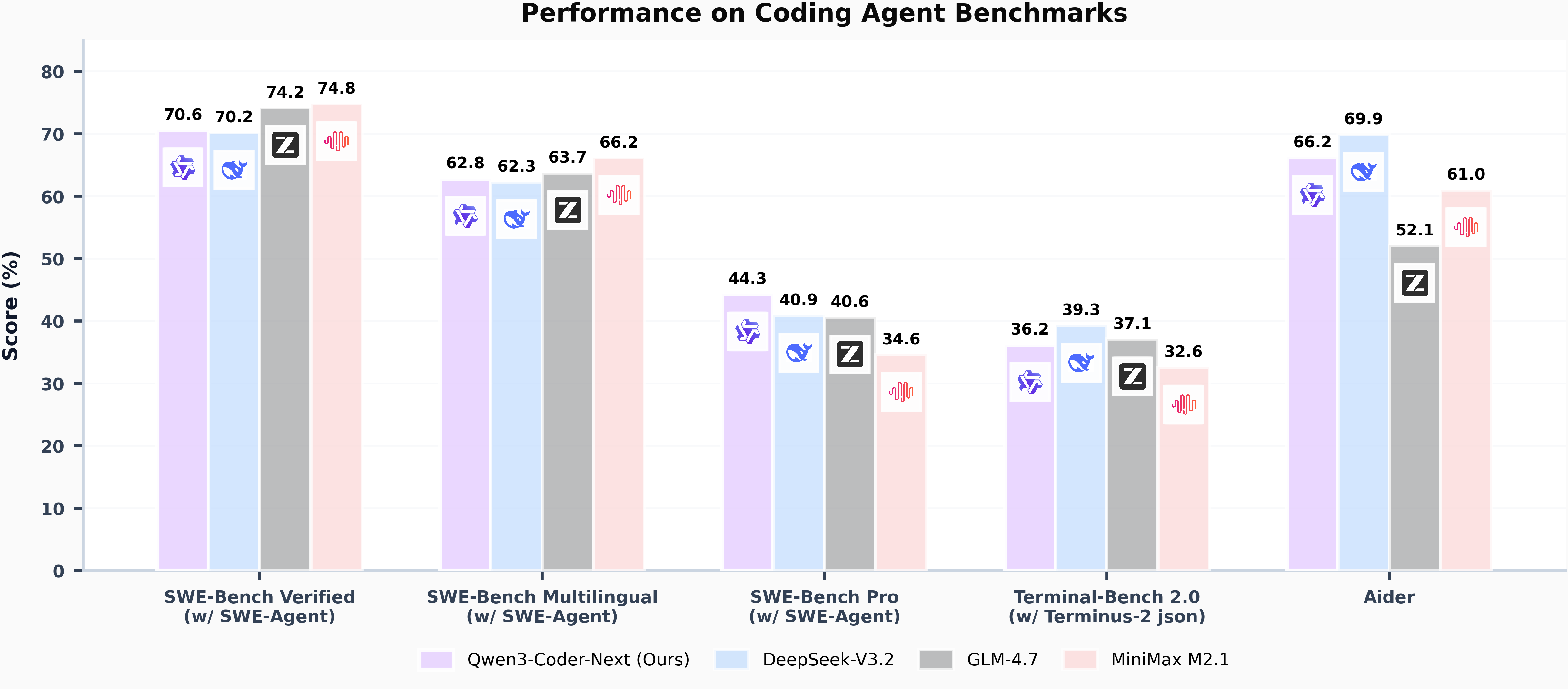
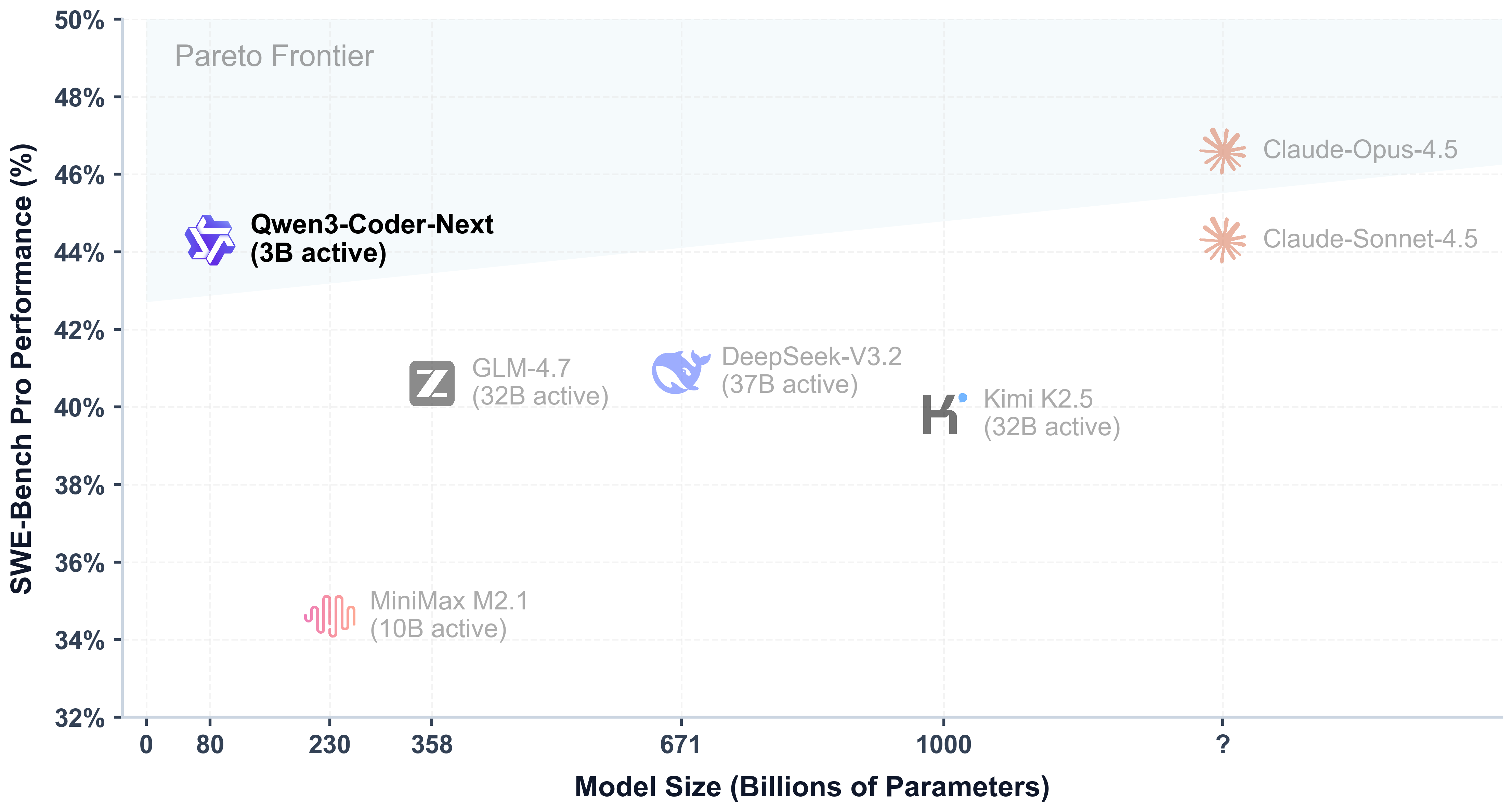
Model Overview
Qwen3-Coder-Next has the following features:
- Type: Causal Language Models
- Training Stage: Pretraining & Post-training
- Number of Parameters: 80B in total and 3B activated
- Number of Parameters (Non-Embedding): 79B
- Hidden Dimension: 2048
- Number of Layers: 48
- Hybrid Layout: 12 * (3 * (Gated DeltaNet -> MoE) -> 1 * (Gated Attention -> MoE))
- Gated Attention:
- Number of Attention Heads: 16 for Q and 2 for KV
- Head Dimension: 256
- Rotary Position Embedding Dimension: 64
- Gated DeltaNet:
- Number of Linear Attention Heads: 32 for V and 16 for QK
- Head Dimension: 128
- Mixture of Experts:
- Number of Experts: 512
- Number of Activated Experts: 10
- Number of Shared Experts: 1
- Expert Intermediate Dimension: 512
- Context Length: 262,144 natively
NOTE: This model supports only non-thinking mode and does not generate <think></think> blocks in its output. Meanwhile, specifying enable_thinking=False is no longer required.
For more details, including benchmark evaluation, hardware requirements, and inference performance, please refer to our blog, GitHub, and Documentation.
Quickstart
We advise you to use the latest version of transformers.
The following contains a code snippet illustrating how to use the model generate content based on given inputs.
Python
from transformers import AutoModelForCausalLM, AutoTokenizer

model_name = "Qwen/Qwen3-Coder-Next"

# load the tokenizer and the model
tokenizer = AutoTokenizer.from_pretrained(model_name)
model = AutoModelForCausalLM.from_pretrained(
  model_name,
  torch_dtype="auto",
  device_map="auto"
)

# prepare the model input
prompt = "Write a quick sort algorithm."
messages = [
  {"role": "user", "content": prompt}
]
text = tokenizer.apply_chat_template(
  messages,
  tokenize=False,
  add_generation_prompt=True,
)
model_inputs = tokenizer([text], return_tensors="pt").to(model.device)

# conduct text completion
generated_ids = model.generate(
    **model_inputs,
    max_new_tokens=65536
)
output_ids = generated_ids[0][len(model_inputs.input_ids[0]):].tolist()

content = tokenizer.decode(output_ids, skip_special_tokens=True)

print("content:", content)
Note: If you encounter out-of-memory (OOM) issues, consider reducing the context length to a shorter value, such as 32,768.
For local use, applications such as Ollama, LMStudio, MLX-LM, llama.cpp, and KTransformers have also supported Qwen3.
Deployment
For deployment, you can use the latest sglang or vllm to create an OpenAI-compatible API endpoint.
SGLang
SGLang is a fast serving framework for large language models and vision language models. SGLang could be used to launch a server with OpenAI-compatible API service.
sglang>=v0.5.8 is required for Qwen3-Coder-Next, which can be installed using:
Shell
pip install 'sglang[all]>=v0.5.8'
See its documentation for more details.
The following command can be used to create an API endpoint at http://localhost:30000/v1 with maximum context length 256K tokens using tensor parallel on 4 GPUs.
Shell
python -m sglang.launch_server --model Qwen/Qwen3-Coder-Next --port 30000 --tp-size 2 --tool-call-parser qwen3_coder
[!Note] The default context length is 256K. Consider reducing the context length to a smaller value, e.g.,
32768, if the server fails to start.
vLLM
vLLM is a high-throughput and memory-efficient inference and serving engine for LLMs. vLLM could be used to launch a server with OpenAI-compatible API service.
vllm>=0.15.0 is required for Qwen3-Coder-Next, which can be installed using:
Shell
pip install 'vllm>=0.15.0'
See its documentation for more details.
The following command can be used to create an API endpoint at http://localhost:8000/v1 with maximum context length 256K tokens using tensor parallel on 4 GPUs.
Shell
vllm serve Qwen/Qwen3-Coder-Next --port 8000 --tensor-parallel-size 2 --enable-auto-tool-choice --tool-call-parser qwen3_coder
[!Note] The default context length is 256K. Consider reducing the context length to a smaller value, e.g.,
32768, if the server fails to start.
Agentic Coding
Qwen3-Coder-Next excels in tool calling capabilities.
You can simply define or use any tools as following example.
Python
# Your tool implementation
def square_the_number(num: float) -> dict:
    return num ** 2

# Define Tools
tools=[
    {
        "type":"function",
        "function":{
            "name": "square_the_number",
            "description": "output the square of the number.",
            "parameters": {
                "type": "object",
                "required": ["input_num"],
                "properties": {
                    'input_num': {
                        'type': 'number',
                        'description': 'input_num is a number that will be squared'
                        }
                },
            }
        }
    }
]

from openai import OpenAI
# Define LLM
client = OpenAI(
    # Use a custom endpoint compatible with OpenAI API
    base_url='http://localhost:8000/v1',  # api_base
    api_key="EMPTY"
)

messages = [{'role': 'user', 'content': 'square the number 1024'}]

completion = client.chat.completions.create(
    messages=messages,
    model="Qwen3-Coder-Next",
    max_tokens=65536,
    tools=tools,
)

print(completion.choices[0])
Best Practices
To achieve optimal performance, we recommend the following sampling parameters: temperature=1.0, top_p=0.95, top_k=40.
Citation
If you find our work helpful, feel free to give us a cite.
INI
@techreport{qwen_qwen3_coder_next_tech_report,
  title        = {Qwen3-Coder-Next Technical Report},
  author       = {{Qwen Team}},
  url          = {https://github.com/QwenLM/Qwen3-Coder/blob/main/qwen3_coder_next_tech_report.pdf},
  note         = {Accessed: 2026-02-03}
}
Capabilities & Tags
transformerssafetensorsqwen3_nexttext-generationconversationalendpoints_compatiblecompressed-tensors
Links & Resources