stable diffusion xl 1.0 inpainting 0.1
by diffusers
Open source · 208k downloads · 364 likes
3.2
(364 reviews)ImageAPI & LocalAbout
Stable Diffusion XL 1.0 Inpainting 0.1 is an AI-powered image generation model capable of creating photorealistic visuals from text descriptions, featuring advanced targeted retouching functionality. Using a masking system, it allows for the modification or completion of specific areas within an image while preserving the rest of the content, ensuring high precision in adjustments. Ideal for artists, designers, or content creators, it excels at altering elements such as backgrounds, objects, or details without disrupting the overall composition. The model stands out for its ability to seamlessly integrate text-suggested modifications while maintaining visual coherence. Its applications span artistic creation, professional image editing, and visual experimentation, though it does not guarantee absolute accuracy or realism.
Documentation
license: openrail++ base_model: stabilityai/stable-diffusion-xl-base-1.0 tags:
- stable-diffusion-xl
- stable-diffusion-xl-diffusers
- text-to-image
- diffusers
- inpainting inference: false
SD-XL Inpainting 0.1 Model Card

SD-XL Inpainting 0.1 is a latent text-to-image diffusion model capable of generating photo-realistic images given any text input, with the extra capability of inpainting the pictures by using a mask.
The SD-XL Inpainting 0.1 was initialized with the stable-diffusion-xl-base-1.0 weights. The model is trained for 40k steps at resolution 1024x1024 and 5% dropping of the text-conditioning to improve classifier-free classifier-free guidance sampling. For inpainting, the UNet has 5 additional input channels (4 for the encoded masked-image and 1 for the mask itself) whose weights were zero-initialized after restoring the non-inpainting checkpoint. During training, we generate synthetic masks and, in 25% mask everything.
How to use
Py
from diffusers import AutoPipelineForInpainting
from diffusers.utils import load_image
import torch

pipe = AutoPipelineForInpainting.from_pretrained("diffusers/stable-diffusion-xl-1.0-inpainting-0.1", torch_dtype=torch.float16, variant="fp16").to("cuda")

img_url = "https://raw.githubusercontent.com/CompVis/latent-diffusion/main/data/inpainting_examples/overture-creations-5sI6fQgYIuo.png"
mask_url = "https://raw.githubusercontent.com/CompVis/latent-diffusion/main/data/inpainting_examples/overture-creations-5sI6fQgYIuo_mask.png"

image = load_image(img_url).resize((1024, 1024))
mask_image = load_image(mask_url).resize((1024, 1024))

prompt = "a tiger sitting on a park bench"
generator = torch.Generator(device="cuda").manual_seed(0)

image = pipe(
  prompt=prompt,
  image=image,
  mask_image=mask_image,
  guidance_scale=8.0,
  num_inference_steps=20,  # steps between 15 and 30 work well for us
  strength=0.99,  # make sure to use `strength` below 1.0
  generator=generator,
).images[0]
How it works:
image | mask_image |
|---|---|
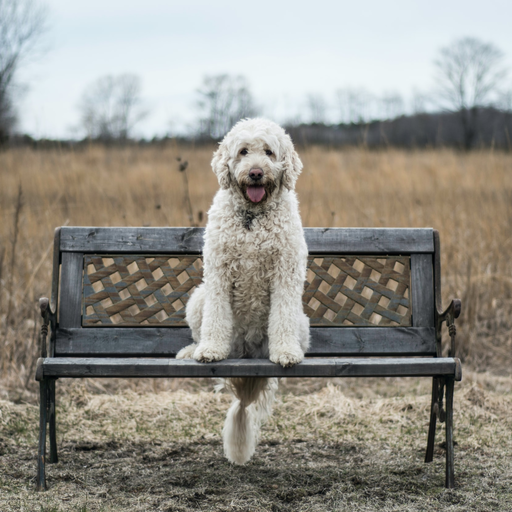 | 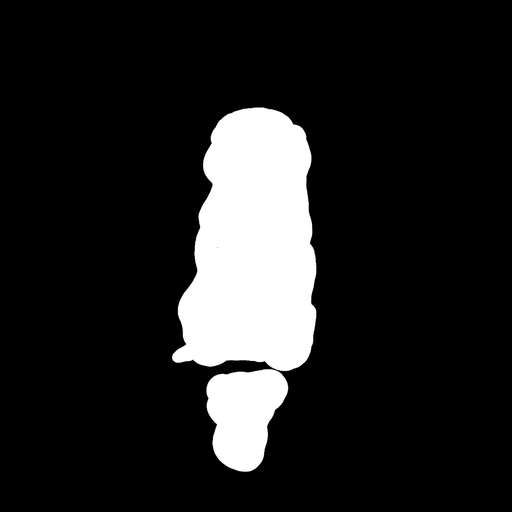 |
prompt | Output |
|---|---|
| a tiger sitting on a park bench | 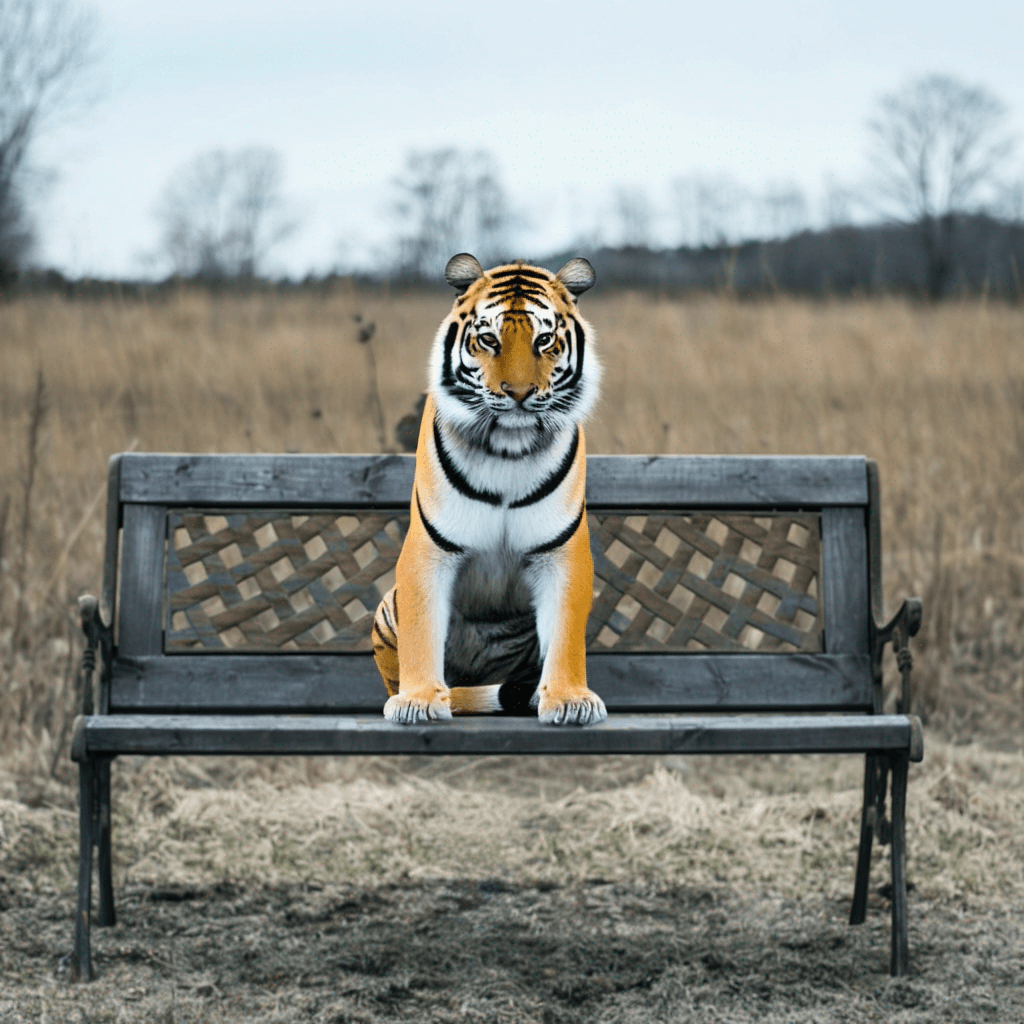 |
Model Description
- Developed by: The Diffusers team
- Model type: Diffusion-based text-to-image generative model
- License: CreativeML Open RAIL++-M License
- Model Description: This is a model that can be used to generate and modify images based on text prompts. It is a Latent Diffusion Model that uses two fixed, pretrained text encoders (OpenCLIP-ViT/G and CLIP-ViT/L).
Uses
Direct Use
The model is intended for research purposes only. Possible research areas and tasks include
- Generation of artworks and use in design and other artistic processes.
- Applications in educational or creative tools.
- Research on generative models.
- Safe deployment of models which have the potential to generate harmful content.
- Probing and understanding the limitations and biases of generative models.
Excluded uses are described below.
Out-of-Scope Use
The model was not trained to be factual or true representations of people or events, and therefore using the model to generate such content is out-of-scope for the abilities of this model.
Limitations and Bias
Limitations
- The model does not achieve perfect photorealism
- The model cannot render legible text
- The model struggles with more difficult tasks which involve compositionality, such as rendering an image corresponding to “A red cube on top of a blue sphere”
- Faces and people in general may not be generated properly.
- The autoencoding part of the model is lossy.
- When the strength parameter is set to 1 (i.e. starting in-painting from a fully masked image), the quality of the image is degraded. The model retains the non-masked contents of the image, but images look less sharp. We're investing this and working on the next version.
Bias
While the capabilities of image generation models are impressive, they can also reinforce or exacerbate social biases.
Capabilities & Tags
diffuserssafetensorsstable-diffusion-xlstable-diffusion-xl-diffuserstext-to-imageinpainting
Links & Resources