by QuantTrio
Open source · 96k downloads · 6 likes
Le modèle Qwen3 Coder 30B A3B Instruct AWQ est une intelligence artificielle spécialisée dans la programmation et les tâches liées au code. Conçu pour exceller dans le développement logiciel, il prend en charge des capacités avancées comme l'exécution d'outils externes et l'interaction avec des environnements de développement, ce qui en fait un assistant idéal pour automatiser des workflows de codage complexes. Grâce à sa capacité native à traiter des contextes extrêmement longs, jusqu'à 256 000 tokens (et jusqu'à 1 million avec des optimisations), il peut analyser et comprendre des projets entiers ou des bases de code volumineuses. Son architecture optimisée, combinant efficacité et performance, le rend particulièrement adapté aux développeurs recherchant un outil puissant pour la génération, la correction ou l'optimisation de code. Ce qui le distingue, c'est son approche "agentique", permettant une interaction fluide avec des plateformes tierces et une exécution autonome de tâches, tout en maintenant une grande précision dans les résultats.
Base model Qwen3-Coder-30B-A3B-Instruct
This model suffers from significant loss under 4-bit quantization, please use with caution.
Note: You must use --enable-expert-parallel to start this model, otherwise the expert tensor TP will not divide evenly. This is required even for 2 GPUs.
CONTEXT_LENGTH=32768

vllm serve \
    tclf90/Qwen3-Coder-30B-A3B-Instruct-AWQ \
    --served-model-name Qwen3-Coder-30B-A3B-Instruct-AWQ \
    --enable-expert-parallel \
    --swap-space 16 \
    --max-num-seqs 512 \
    --max-model-len $CONTEXT_LENGTH \
    --max-seq-len-to-capture $CONTEXT_LENGTH \
    --gpu-memory-utilization 0.9 \
    --tensor-parallel-size 4 \
    --trust-remote-code \
    --disable-log-requests \
    --host 0.0.0.0 \
    --port 8000
vllm==0.10.0
2025-08-19
1.[BugFix] Fix compatibility issues with vLLM 0.10.1
2025-08-01
1. 首次commit
| 文件大小 | 最近更新时间 |
|---|---|
16GB | 2025-08-01 |
from modelscope import snapshot_download
snapshot_download('tclf90/Qwen3-Coder-30B-A3B-Instruct-AWQ', cache_dir="本地路径")

Qwen3-Coder is available in multiple sizes. Today, we're excited to introduce Qwen3-Coder-30B-A3B-Instruct. This streamlined model maintains impressive performance and efficiency, featuring the following key enhancements:
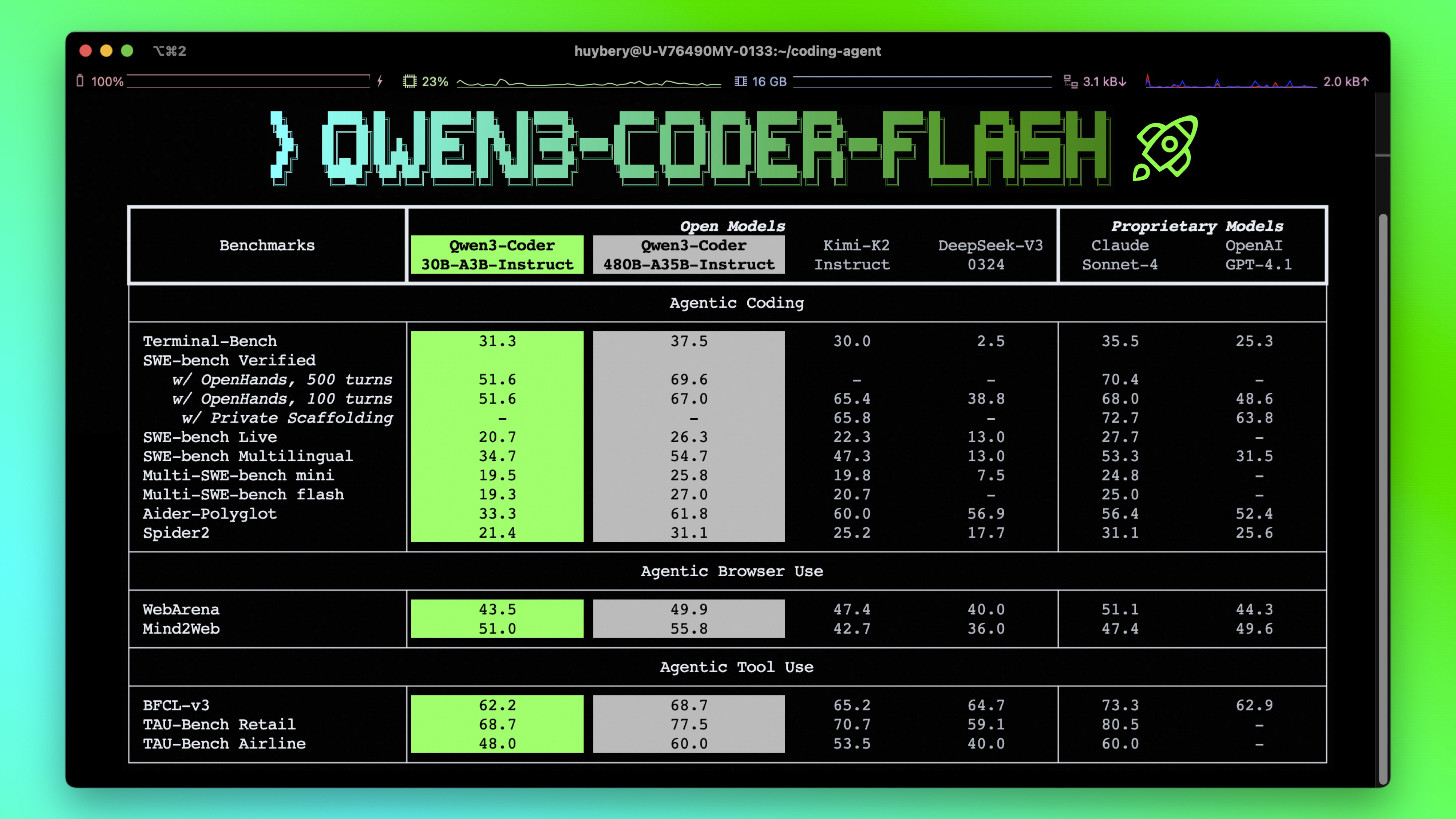
Qwen3-Coder-30B-A3B-Instruct has the following features:
NOTE: This model supports only non-thinking mode and does not generate <think></think> blocks in its output. Meanwhile, specifying enable_thinking=False is no longer required.
For more details, including benchmark evaluation, hardware requirements, and inference performance, please refer to our blog, GitHub, and Documentation.
We advise you to use the latest version of transformers.
With transformers<4.51.0, you will encounter the following error:
KeyError: 'qwen3_moe'
The following contains a code snippet illustrating how to use the model generate content based on given inputs.
from transformers import AutoModelForCausalLM, AutoTokenizer

model_name = "Qwen/Qwen3-Coder-30B-A3B-Instruct"

# load the tokenizer and the model
tokenizer = AutoTokenizer.from_pretrained(model_name)
model = AutoModelForCausalLM.from_pretrained(
    model_name,
    torch_dtype="auto",
    device_map="auto"
)

# prepare the model input
prompt = "Write a quick sort algorithm."
messages = [
    {"role": "user", "content": prompt}
]
text = tokenizer.apply_chat_template(
    messages,
    tokenize=False,
    add_generation_prompt=True,
)
model_inputs = tokenizer([text], return_tensors="pt").to(model.device)

# conduct text completion
generated_ids = model.generate(
    **model_inputs,
    max_new_tokens=65536
)
output_ids = generated_ids[0][len(model_inputs.input_ids[0]):].tolist()

content = tokenizer.decode(output_ids, skip_special_tokens=True)

print("content:", content)
Note: If you encounter out-of-memory (OOM) issues, consider reducing the context length to a shorter value, such as 32,768.
For local use, applications such as Ollama, LMStudio, MLX-LM, llama.cpp, and KTransformers have also supported Qwen3.
Qwen3-Coder excels in tool calling capabilities.
You can simply define or use any tools as following example.
# Your tool implementation
def square_the_number(num: float) -> dict:
    return num ** 2

# Define Tools
tools=[
    {
        "type":"function",
        "function":{
            "name": "square_the_number",
            "description": "output the square of the number.",
            "parameters": {
                "type": "object",
                "required": ["input_num"],
                "properties": {
                    'input_num': {
                        'type': 'number',
                        'description': 'input_num is a number that will be squared'
                        }
                },
            }
        }
    }
]

import OpenAI
# Define LLM
client = OpenAI(
    # Use a custom endpoint compatible with OpenAI API
    base_url='http://localhost:8000/v1',  # api_base
    api_key="EMPTY"
)

messages = [{'role': 'user', 'content': 'square the number 1024'}]

completion = client.chat.completions.create(
    messages=messages,
    model="Qwen3-Coder-30B-A3B-Instruct",
    max_tokens=65536,
    tools=tools,
)

print(completion.choice[0])
To achieve optimal performance, we recommend the following settings:
Sampling Parameters:
temperature=0.7, top_p=0.8, top_k=20, repetition_penalty=1.05.Adequate Output Length: We recommend using an output length of 65,536 tokens for most queries, which is adequate for instruct models.
If you find our work helpful, feel free to give us a cite.
@misc{qwen3technicalreport,
      title={Qwen3 Technical Report},
      author={Qwen Team},
      year={2025},
      eprint={2505.09388},
      archivePrefix={arXiv},
      primaryClass={cs.CL},
      url={https://arxiv.org/abs/2505.09388},
}
