by Qwen
Open source · 235k downloads · 147 likes
The Qwen3 235B A22B Instruct 2507 FP8 model is an optimized and FP8-quantized version of the Qwen3 model, specifically designed to excel in instruction-based and advanced comprehension tasks. It stands out with significant improvements in logical reasoning, text comprehension, mathematics, sciences, and code generation, while also offering broader knowledge coverage across numerous languages. Thanks to its native ability to process extremely long contexts (up to 256,000 tokens), it is particularly well-suited for applications requiring in-depth analysis of complex documents or conversations. Its enhanced alignment with user preferences makes it highly effective for subjective or open-ended tasks, ensuring more relevant and nuanced responses. Finally, its FP8 version optimizes computational efficiency without compromising quality, making it an ideal choice for large-scale deployments or resource-constrained environments.

We introduce the updated version of the Qwen3-235B-A22B-FP8 non-thinking mode, named Qwen3-235B-A22B-Instruct-2507-FP8, featuring the following key enhancements:
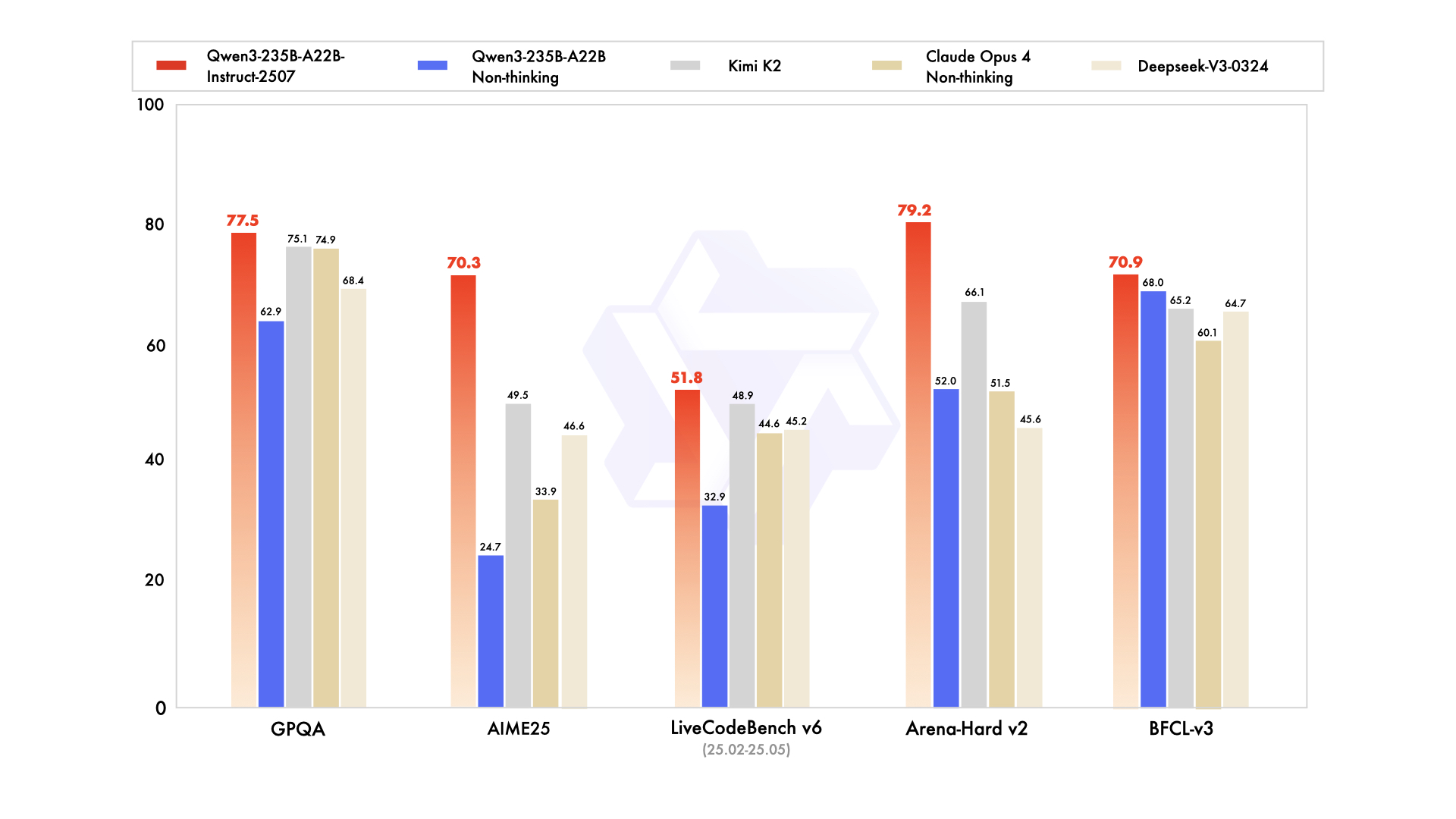
This repo contains the FP8 version of Qwen3-235B-A22B-Instruct-2507, which has the following features:
NOTE: This model supports only non-thinking mode and does not generate <think></think> blocks in its output. Meanwhile, specifying enable_thinking=False is no longer required.
For more details, including benchmark evaluation, hardware requirements, and inference performance, please refer to our blog, GitHub, and Documentation.
| Deepseek-V3-0324 | GPT-4o-0327 | Claude Opus 4 Non-thinking | Kimi K2 | Qwen3-235B-A22B Non-thinking | Qwen3-235B-A22B-Instruct-2507 | |
|---|---|---|---|---|---|---|
| Knowledge | ||||||
| MMLU-Pro | 81.2 | 79.8 | 86.6 | 81.1 | 75.2 | 83.0 |
| MMLU-Redux | 90.4 | 91.3 | 94.2 | 92.7 | 89.2 | 93.1 |
| GPQA | 68.4 | 66.9 | 74.9 | 75.1 | 62.9 | 77.5 |
| SuperGPQA | 57.3 | 51.0 | 56.5 | 57.2 | 48.2 | 62.6 |
| SimpleQA | 27.2 | 40.3 | 22.8 | 31.0 | 12.2 | 54.3 |
| CSimpleQA | 71.1 | 60.2 | 68.0 | 74.5 | 60.8 | 84.3 |
| Reasoning | ||||||
| AIME25 | 46.6 | 26.7 | 33.9 | 49.5 | 24.7 | 70.3 |
| HMMT25 | 27.5 | 7.9 | 15.9 | 38.8 | 10.0 | 55.4 |
| ARC-AGI | 9.0 | 8.8 | 30.3 | 13.3 | 4.3 | 41.8 |
| ZebraLogic | 83.4 | 52.6 | - | 89.0 | 37.7 | 95.0 |
| LiveBench 20241125 | 66.9 | 63.7 | 74.6 | 76.4 | 62.5 | 75.4 |
| Coding | ||||||
| LiveCodeBench v6 (25.02-25.05) | 45.2 | 35.8 | 44.6 | 48.9 | 32.9 | 51.8 |
| MultiPL-E | 82.2 | 82.7 | 88.5 | 85.7 | 79.3 | 87.9 |
| Aider-Polyglot | 55.1 | 45.3 | 70.7 | 59.0 | 59.6 | 57.3 |
| Alignment | ||||||
| IFEval | 82.3 | 83.9 | 87.4 | 89.8 | 83.2 | 88.7 |
| Arena-Hard v2* | 45.6 | 61.9 | 51.5 | 66.1 | 52.0 | 79.2 |
| Creative Writing v3 | 81.6 | 84.9 | 83.8 | 88.1 | 80.4 | 87.5 |
| WritingBench | 74.5 | 75.5 | 79.2 | 86.2 | 77.0 | 85.2 |
| Agent | ||||||
| BFCL-v3 | 64.7 | 66.5 | 60.1 | 65.2 | 68.0 | 70.9 |
| TAU1-Retail | 49.6 | 60.3# | 81.4 | 70.7 | 65.2 | 71.3 |
| TAU1-Airline | 32.0 | 42.8# | 59.6 | 53.5 | 32.0 | 44.0 |
| TAU2-Retail | 71.1 | 66.7# | 75.5 | 70.6 | 64.9 | 74.6 |
| TAU2-Airline | 36.0 | 42.0# | 55.5 | 56.5 | 36.0 | 50.0 |
| TAU2-Telecom | 34.0 | 29.8# | 45.2 | 65.8 | 24.6 | 32.5 |
| Multilingualism | ||||||
| MultiIF | 66.5 | 70.4 | - | 76.2 | 70.2 | 77.5 |
| MMLU-ProX | 75.8 | 76.2 | - | 74.5 | 73.2 | 79.4 |
| INCLUDE | 80.1 | 82.1 | - | 76.9 | 75.6 | 79.5 |
| PolyMATH | 32.2 | 25.5 | 30.0 | 44.8 | 27.0 | 50.2 |
*: For reproducibility, we report the win rates evaluated by GPT-4.1.
#: Results were generated using GPT-4o-20241120, as access to the native function calling API of GPT-4o-0327 was unavailable.
The code of Qwen3-MoE has been in the latest Hugging Face transformers and we advise you to use the latest version of transformers.
With transformers<4.51.0, you will encounter the following error:
KeyError: 'qwen3_moe'
The following contains a code snippet illustrating how to use the model generate content based on given inputs.
from transformers import AutoModelForCausalLM, AutoTokenizer

model_name = "Qwen/Qwen3-235B-A22B-Instruct-2507-FP8"

# load the tokenizer and the model
tokenizer = AutoTokenizer.from_pretrained(model_name)
model = AutoModelForCausalLM.from_pretrained(
    model_name,
    torch_dtype="auto",
    device_map="auto"
)

# prepare the model input
prompt = "Give me a short introduction to large language model."
messages = [
    {"role": "user", "content": prompt}
]
text = tokenizer.apply_chat_template(
    messages,
    tokenize=False,
    add_generation_prompt=True,
)
model_inputs = tokenizer([text], return_tensors="pt").to(model.device)

# conduct text completion
generated_ids = model.generate(
    **model_inputs,
    max_new_tokens=16384
)
output_ids = generated_ids[0][len(model_inputs.input_ids[0]):].tolist()

content = tokenizer.decode(output_ids, skip_special_tokens=True)

print("content:", content)
For deployment, you can use sglang>=0.4.6.post1 or vllm>=0.8.5 or to create an OpenAI-compatible API endpoint:
python -m sglang.launch_server --model-path Qwen/Qwen3-235B-A22B-Instruct-2507-FP8 --tp 4 --context-length 262144
vllm serve Qwen/Qwen3-235B-A22B-Instruct-2507-FP8 --tensor-parallel-size 4 --max-model-len 262144
Note: If you encounter out-of-memory (OOM) issues, consider reducing the context length to a shorter value, such as 32,768.
For local use, applications such as Ollama, LMStudio, MLX-LM, llama.cpp, and KTransformers have also supported Qwen3.
For convenience and performance, we have provided fp8-quantized model checkpoint for Qwen3, whose name ends with -FP8. The quantization method is fine-grained fp8 quantization with block size of 128. You can find more details in the quantization_config field in config.json.
You can use the Qwen3-235B-A22B-Instruct-2507-FP8 model with serveral inference frameworks, including transformers, sglang, and vllm, as the original bfloat16 model.
However, please pay attention to the following known issues:
transformers:
transformers for distributed inference. You may need to set the environment variable CUDA_LAUNCH_BLOCKING=1 if multiple devices are used in inference.Qwen3 excels in tool calling capabilities. We recommend using Qwen-Agent to make the best use of agentic ability of Qwen3. Qwen-Agent encapsulates tool-calling templates and tool-calling parsers internally, greatly reducing coding complexity.
To define the available tools, you can use the MCP configuration file, use the integrated tool of Qwen-Agent, or integrate other tools by yourself.
from qwen_agent.agents import Assistant

# Define LLM
llm_cfg = {
    'model': 'Qwen3-235B-A22B-Instruct-2507-FP8',

    # Use a custom endpoint compatible with OpenAI API:
    'model_server': 'http://localhost:8000/v1',  # api_base
    'api_key': 'EMPTY',
}

# Define Tools
tools = [
    {'mcpServers': {  # You can specify the MCP configuration file
            'time': {
                'command': 'uvx',
                'args': ['mcp-server-time', '--local-timezone=Asia/Shanghai']
            },
            "fetch": {
                "command": "uvx",
                "args": ["mcp-server-fetch"]
            }
        }
    },
  'code_interpreter',  # Built-in tools
]

# Define Agent
bot = Assistant(llm=llm_cfg, function_list=tools)

# Streaming generation
messages = [{'role': 'user', 'content': 'https://qwenlm.github.io/blog/ Introduce the latest developments of Qwen'}]
for responses in bot.run(messages=messages):
    pass
print(responses)
To achieve optimal performance, we recommend the following settings:
Sampling Parameters:
Temperature=0.7, TopP=0.8, TopK=20, and MinP=0.presence_penalty parameter between 0 and 2 to reduce endless repetitions. However, using a higher value may occasionally result in language mixing and a slight decrease in model performance.Adequate Output Length: We recommend using an output length of 16,384 tokens for most queries, which is adequate for instruct models.
Standardize Output Format: We recommend using prompts to standardize model outputs when benchmarking.
answer field with only the choice letter, e.g., "answer": "C"."If you find our work helpful, feel free to give us a cite.
@misc{qwen3technicalreport,
      title={Qwen3 Technical Report},
      author={Qwen Team},
      year={2025},
      eprint={2505.09388},
      archivePrefix={arXiv},
      primaryClass={cs.CL},
      url={https://arxiv.org/abs/2505.09388},
}
